

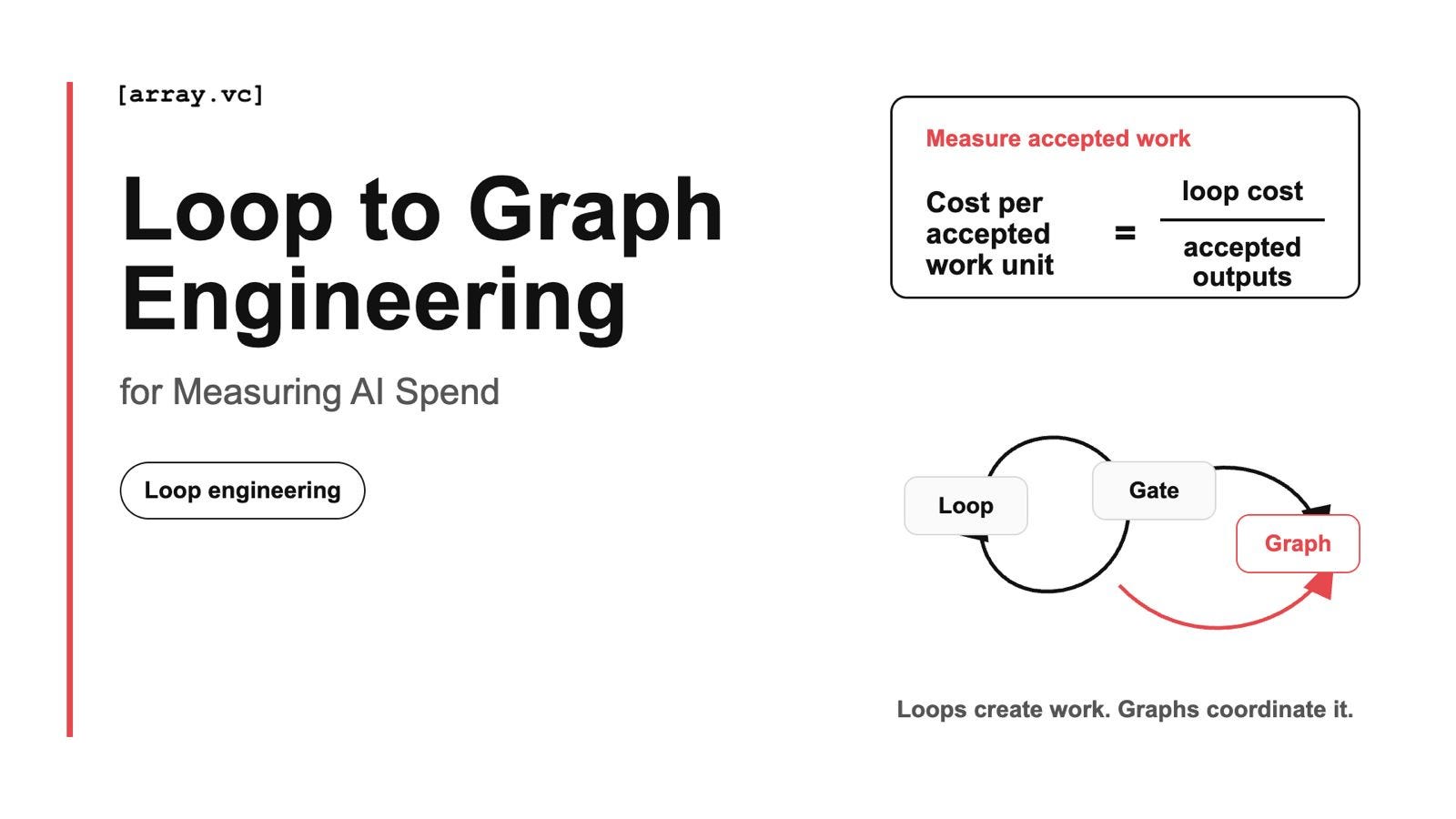
AI Spend as we all know is getting hard to manage and Loop and Graph Engineering are great way to measure AI spend and productivity
Stop prompting agents. Start designing loops.
2. Move from Loops to Graph Engineering

Most companies I talk to are still asking the practical question: what do loops and graphs actually mean for a company?
The prompt engineering way was simple. You asked the model for something. It gave you an answer. You read it, decided what was wrong, added more context, and asked again. The model helped with the work, but you still managed every turn.
You were doing the hidden parts of the workflow: deciding what to try next, checking whether the answer was useful, remembering what already failed, and knowing when to stop. In practice, you were the loop.
The easy take is that prompt engineering is dead. I do not think that is quite right. Prompting is not going away. It is moving up a level. A prompt is a single instruction. A loop is a job with a process around it.
Instead of telling the agent what to do every turn, you define the goal, tools, checks, and stop conditions that let it keep working without you. They turn model output into work that can be accepted, rejected, retried, priced, and improved.
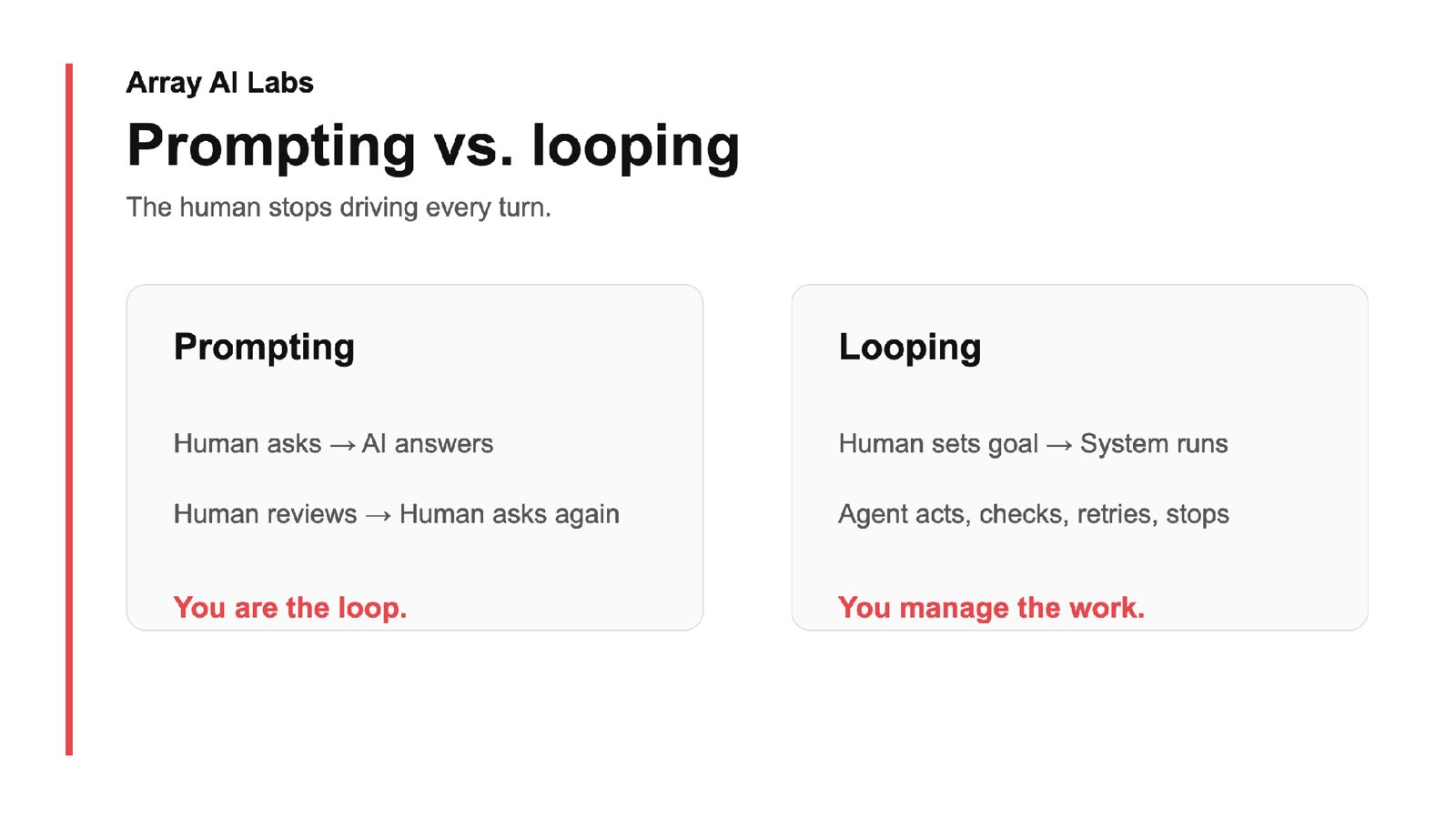
Prompting versus looping
That made sense when AI was mostly a chat box.
It starts to break once AI becomes an agent.
Agents can read files, call tools, search systems, write code, open tickets, update CRMs, and trigger workflows across software. Once the system can act, the hard part is no longer writing the perfect prompt. The hard part is designing the process around the agent.
That process is the loop.
A real loop has 5 steps.
Discover: work out what needs to happen.
Plan: choose the next action.
Execute: do the work with tools.
Verify: compare the result to the goal.
Iterate: feed the result back in and try again if it failed.
The agent needs state, so it does not repeat the same mistake every pass. It needs a stop condition, so it does not run all night. It needs a real check on the work, or it will just agree with itself until your token budget is gone.
This is the difference between a prompt and a loop. A prompt gives the model an instruction. A loop gives the model a job, a way to know whether the job is done, and a rule for when to give up.
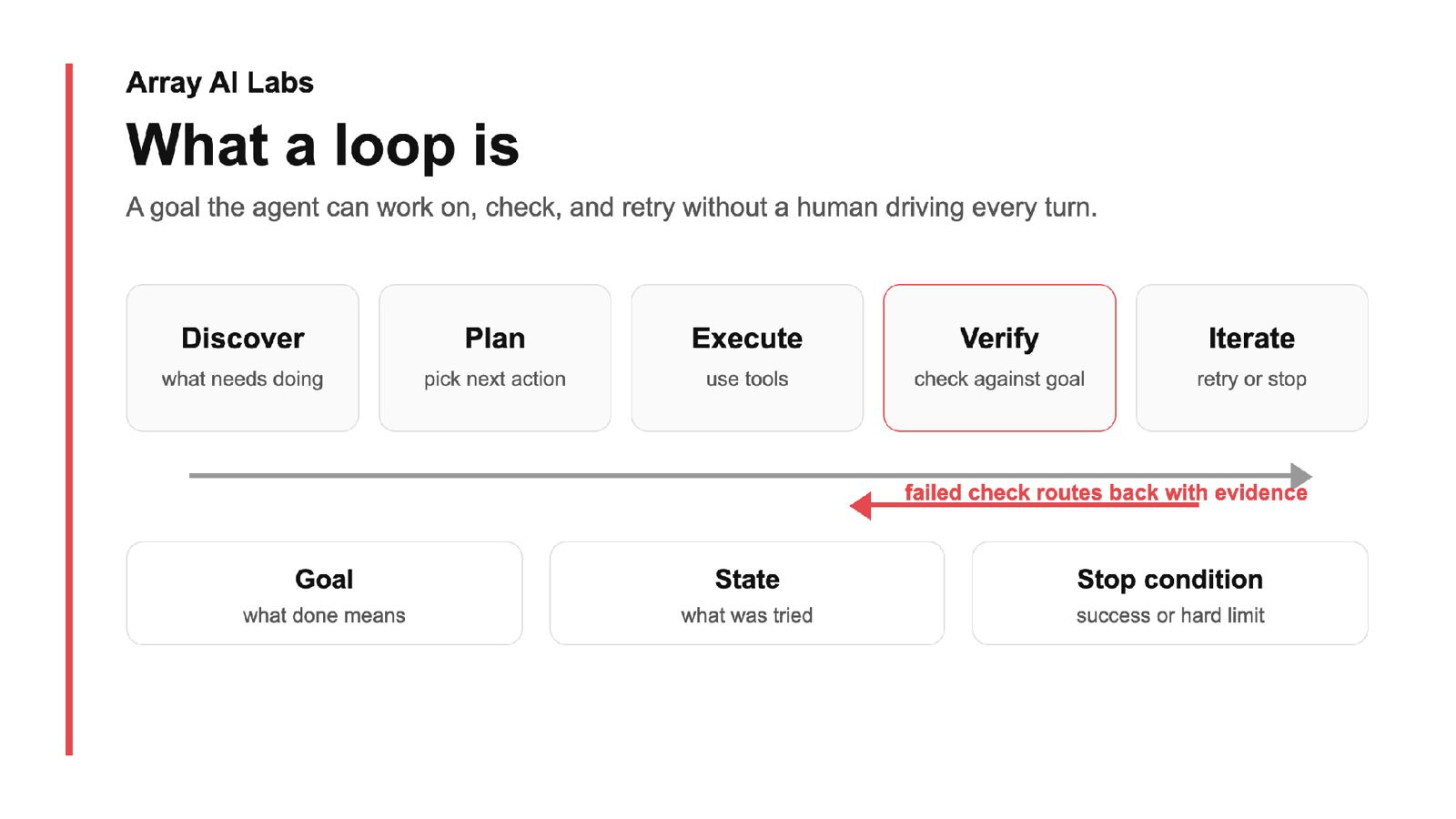
What is a loop?
Here is the simplest coding version.
Goal: fix the auth tests.
Each pass: run the tests, read the failure, make the smallest useful change, run the tests again.
Success: auth tests pass, type checks pass, lint is clean.
Stop: success, or eight attempts with a summary of what still fails.
That is a loop. Not because it uses AI. Because the system can keep moving without a human prompting every step.
Coding is where this is showing up first because software already has feedback built in.
Tests fail. Builds break. Type errors show up. The agent can try a fix, run the checks, read the failure, change the code, and try again.
That is why coding agents feel ahead of the rest of the agent market. Developers adopted them early, but code also gives agents a clean environment to improve inside.
The same pattern is coming to other workflows, but the moves changes by industry.
In support, the accepted output is a resolved ticket. In finance, it is a reconciled invoice. In sales, it is a qualified account. In compliance, it is an exception cleared or routed to the right reviewer.
The business value becomes clearer when each loop produces a result that can be accepted or rejected. This gives companies a way to measure AI work through completed outcomes rather than tokens used or agent runs.
We think of each accepted result as an Accepted Work Unit.
Once the output can be accepted or rejected, a company can measure its cost per accepted work unit.
This connects AI spend to work the business already understands.
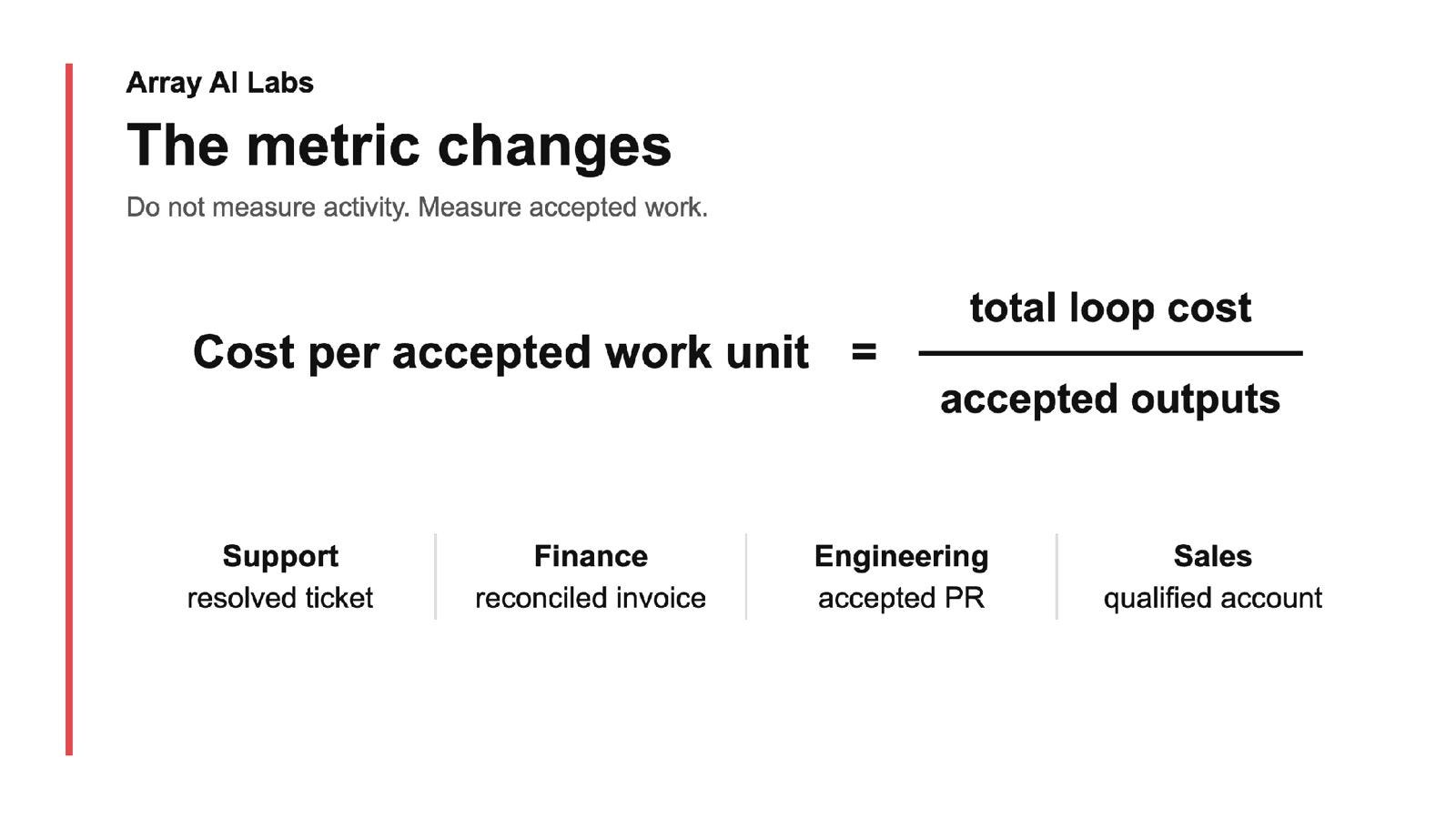
AI Spend Measured In Cost per accepted work unit
Many agent demos feel better than they actually are.
A demo can show a lot of motion. Tabs open, tools fire, agents talk to each other, and a task appears to move forward.
Buyers do not pay for motion. They pay for completed work they can trust.
Zendesk is already moving in this direction with outcome-based AI pricing for support. Customers pay when a problem is resolved, not when an agent runs.
That is the right mental model. AI agents should not be measured like software seats. They should be measured more like labor.
What did they complete? How often was it accepted? How often did a human step in? What did each accepted unit cost?
That is a higher bar than a demo. It is also a much bigger company-building opportunity.
Measuring this reliably creates room for a new infrastructure layer. The next AI stack will look less like chat and more like operations infrastructure for loops and graphs. The generic version of this stack is already becoming standard: sandboxes, evals, observability, permissions, connectors. The loop-specific version is more interesting.
A production loop needs a job spec, so the agent knows the goal, scope, and definition of done. It needs a state ledger, so run 12 knows what runs 1 through 11 already tried. It needs a tool envelope, so the agent can act but only inside approved boundaries.
It also needs a gate, so soft completion does not count as real completion. It needs a budget policy, so the loop stops before it burns through tokens or creates review debt. It needs an escalation queue, so uncertain work lands with a person instead of getting silently accepted.
That is the LoopOps stack which is not just infrastructure for agents. Infrastructure for repeated AI work.
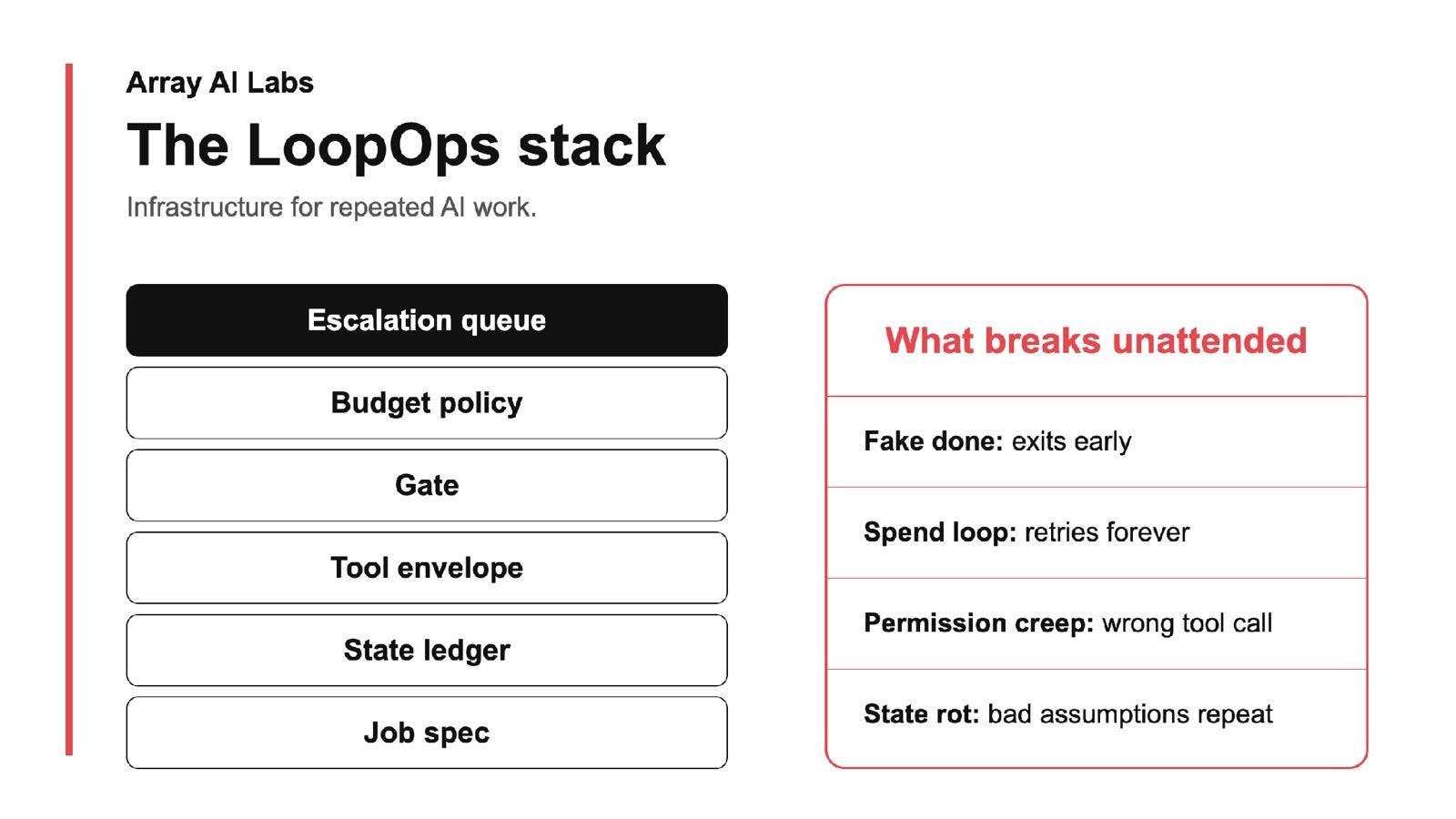
Risks Solved with LoopOps Stack
Ralph Wiggum failure
The agent declares the job done too early. The loop accepts that soft completion signal, exits, and leaves a half-finished result behind. Without a hard gate, loops fail quietly. That’s known as the mode loop.
This usually comes from three things: no real verifier, soft completion conditions, and no hard stop.
The fix is not another agent with an opinion. It is an objective gate. A test that passes or fails. A build that compiles or does not. A linter that returns zero or non-zero. A policy check that blocks the action.
2. Goal drift
Agentic laziness where the loop decides “done enough” is done. Goal drift over long sessions. Self-preferential bias when the same agent grades its own work.
3. Flawed Loop
A loop can call the wrong tool with the right-sounding reason, or store a bad assumption and repeat it every morning. The worst case is not always one catastrophic action. Sometimes it is a slow pileup of review debt, token spend, and quiet errors.
This is why I do not think loop engineering is just a prompt trick. It is closer to operations design.
Verrtical AI Loop create Differentiation
A generic loop can run the pattern but a vertical loop knows the messy details that make the pattern useful: the data, the edge cases, the customer workflow, the regulatory constraint, the escalation path.
That is where defensibility starts. Not in having another agent but in owning the feedback loop for a specific kind of work.
The best AI companies will not replace an entire job on day one. The more likely path is that companies automate repeatable loops inside a job first. Password resets before full customer support. Invoice matching before full finance ops. Test fixing before full engineering ownership. Account research before full sales replacement.
Each loop earns trust by doing a narrow slice of work at a known quality and cost. That is how AI labor enters the enterprise: workflow by workflow, not all at once in each vertical.
At Array, we are interested in founders building this layer. Agent infrastructure, vertical AI, workflow automation, AI ops, eval systems, and the boring-but-beautiful systems that make agents useful in production.
If you are building here DM or email me shruti@array.vc
Loop engineering is not the end of prompting. We also dive into Graph Engineering next. So follow us to see that next!